Welcome to Chazix Scripts. The site is currently under construction, but soon more information will become available for each individual project.
For now, check out the: Unity3D Tooltip System

Welcome to Chazix Scripts. The site is currently under construction, but soon more information will become available for each individual project.
For now, check out the: Unity3D Tooltip System

 The Tooltip System is designed such that a visual GUI will be drawn onto the screen when the mouse is hovering over a specific Icon element or an in world Transform object.
The Icon element is provided with the package, it’s purpose is to allow your Tooltips a reference of where to locate the proper data based on the type and name of that Icon. 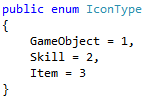 Icons are categorized based off three different types: Item, Skill and GameObject, each type is associated with it’s own text file. Different types and file paths can be added and changed easily, but by default these are the initial settings.
Continue reading
 The DC/RTS Controller is designed to act as either a Dungeon Crawler or RTS System, meaning that the way the camera acts is in a bird’s eye, top down view. Such that in a Dungeon Crawler there is usually only one active controllable object, but in an RTS you usually have many controllable objects.
The present features of the camera allow you to move it around in various ways. Such as, with the W, A, S, and D keys you can move it’s location forward, left, backward or right. With the Q, and E keys the camera’s rotation will pivot around counter-clockwise or clockwise, zooming in and out with the mouse wheel is also supported. A toggle key: Space Bar by default has also been implemented to allow for activation of the camera to move toward a selected controllable object if it isn’t near it, as well as make the camera follow that object. Continue reading